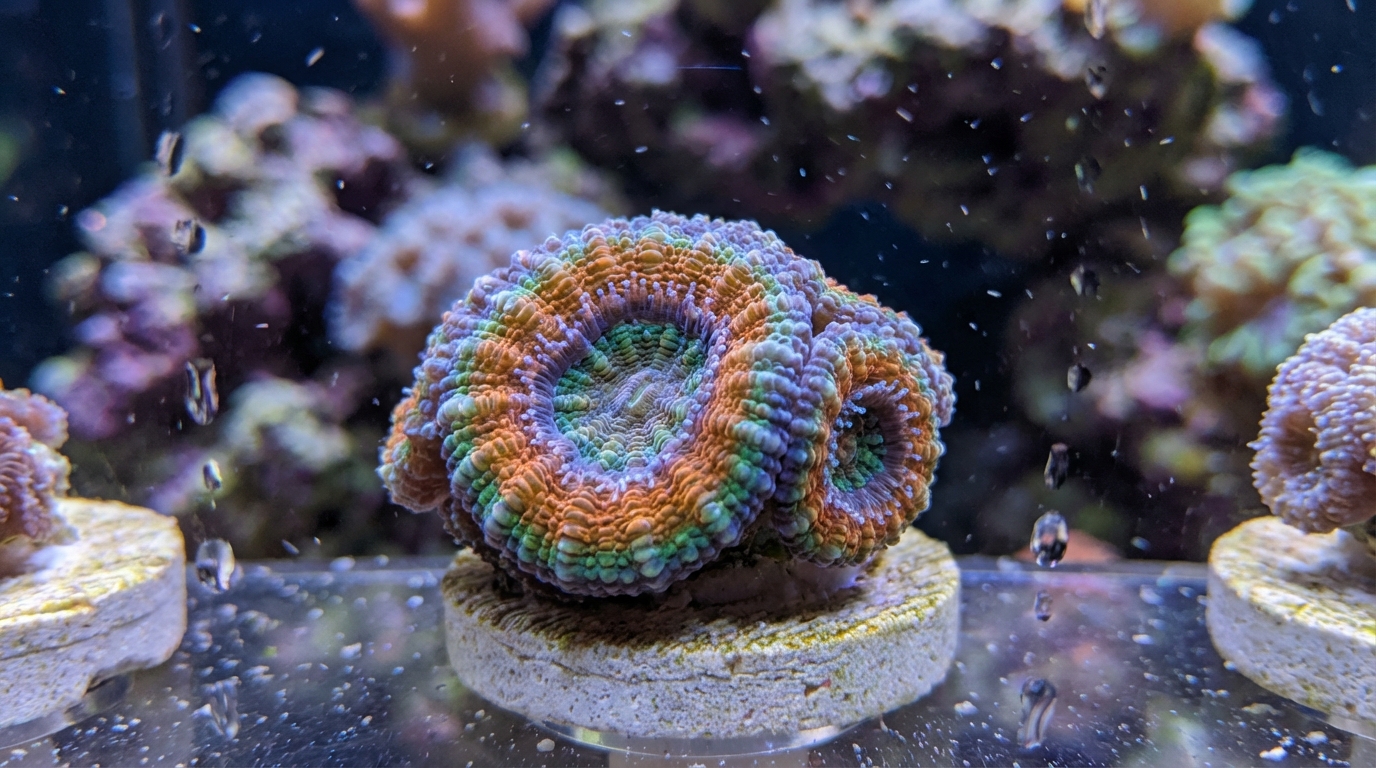
What is WYSIWYG Coral?
Quick Answer
WYSIWYG stands for "What You See Is What You Get." When buying WYSIWYG coral, you receive the exact coral pictured in the listing, not a similar or representative piece.
WYSIWYG: The Gold Standard of Online Coral Shopping
WYSIWYG stands for "What You See Is What You Get." When a coral is listed as WYSIWYG, the exact coral shown in the photo is the one that will be shipped to you. This differs fundamentally from "representative" or "stock photo" listings where you might receive a similar—but different—specimen.
Understanding WYSIWYG is crucial for anyone buying coral online, especially for high-end pieces where specific patterns, colors, and growth characteristics matter.
WYSIWYG vs. Representative Listings
WYSIWYG Listings
- Photo shows the exact coral you'll receive
- What you see is literally what ships to you
- Price reflects that specific specimen
- Typically higher-end or unique pieces
- More expensive but no surprises
Representative/Stock Listings
- Photo is an example of what you might receive
- You get a coral "similar to" the photo
- Quality and appearance can vary
- Often used for common, fast-growing varieties
- Usually cheaper, but with more risk
Why WYSIWYG Matters
Coral Color Variation
Coral color can vary dramatically between specimens, even within the same species. A "rainbow acan" from a stock listing might arrive with completely different colors than pictured. With WYSIWYG, that stunning blue center with orange stripes? That's exactly what you're getting.
Growth Patterns
Coral shape and growth form are unique to each piece. An encrusting coral might grow flat or bubble up; branching corals develop unique structures. WYSIWYG lets you choose the exact form you want.
Size and Value
WYSIWYG photos typically include size references or measurements. You know exactly what you're paying for—no surprise micro-frags when you expected a colony.
How Sellers Create WYSIWYG Listings
Reputable WYSIWYG sellers follow specific practices:
- Individual photos of each coral under consistent lighting
- Unique SKU or ID that tracks that specific piece
- Accurate lighting—quality sellers show corals under actinic blues AND white light
- Size reference—frag plug, ruler, or dimensions listed
- Multiple angles for colonies or complex pieces
Reading WYSIWYG Photos
Lighting Matters
Coral photography is tricky. Heavy blue/actinic lighting makes corals "pop" but can misrepresent true colors. Look for sellers who show:
- Blue/actinic light photos: Shows fluorescence and "wow factor"
- White/daylight photos: Shows true colors you'll see under normal viewing
- Mixed lighting: Represents typical reef tank conditions
Look for Red Flags
- Overly saturated photos: Colors boosted in editing software
- Heavy filtering: Orange filters that mask brown undertones
- No size reference: That "colony" might be smaller than expected
- Single angle only: What's hiding on the other side?
When to Choose WYSIWYG
Always Choose WYSIWYG For:
- High-end pieces: Rare morphs, expensive colonies, collector items
- Color-critical corals: Rainbow acans, designer zoanthids, chalices
- Large purchases: Any coral over $50-100 should be WYSIWYG
- Corals with variable appearance: Goniopora, mushrooms, ricordea
Representative Might Be OK For:
- Common beginner corals: Green star polyps, xenia, standard zoanthids
- Bulk purchases: Buying 10 standard frags at a discount
- Known, consistent varieties: Simple corals with little variation
- Trusted local shops: Where you can pick up and inspect
Questions to Ask Before Buying
- "Is this the exact coral I'll receive?"—Confirm WYSIWYG status
- "Can I see it under different lighting?"—Good sellers often provide additional photos
- "What size is the frag/colony?"—Get measurements if not listed
- "How long has it been in your system?"—Longer holding = more stable coral
- "What parameters do you run?"—Helps with acclimation
Protecting Yourself as a Buyer
Document Everything
- Screenshot the listing and photos before purchase
- Save all communication with the seller
- Photograph the coral immediately upon arrival
- Video the unboxing if possible
Understand DOA Policies
Even with WYSIWYG, things can go wrong during shipping. Ensure you understand the seller's Dead On Arrival policy before buying. Most require photos within hours of delivery.
Research the Seller
Look for reviews specifically mentioning photo accuracy. Did buyers feel the coral matched the listing? A seller with great WYSIWYG accuracy is worth their premium prices.
The ReefBay Advantage
On ReefBay, you can browse WYSIWYG listings from verified sellers with clear photos and descriptions. Our platform makes it easy to see exactly what you're buying, communicate with sellers, and shop with confidence.
Whether you're hunting for a rare morph or building your first reef, understanding WYSIWYG helps you shop smarter and avoid disappointment.
Was this helpful?