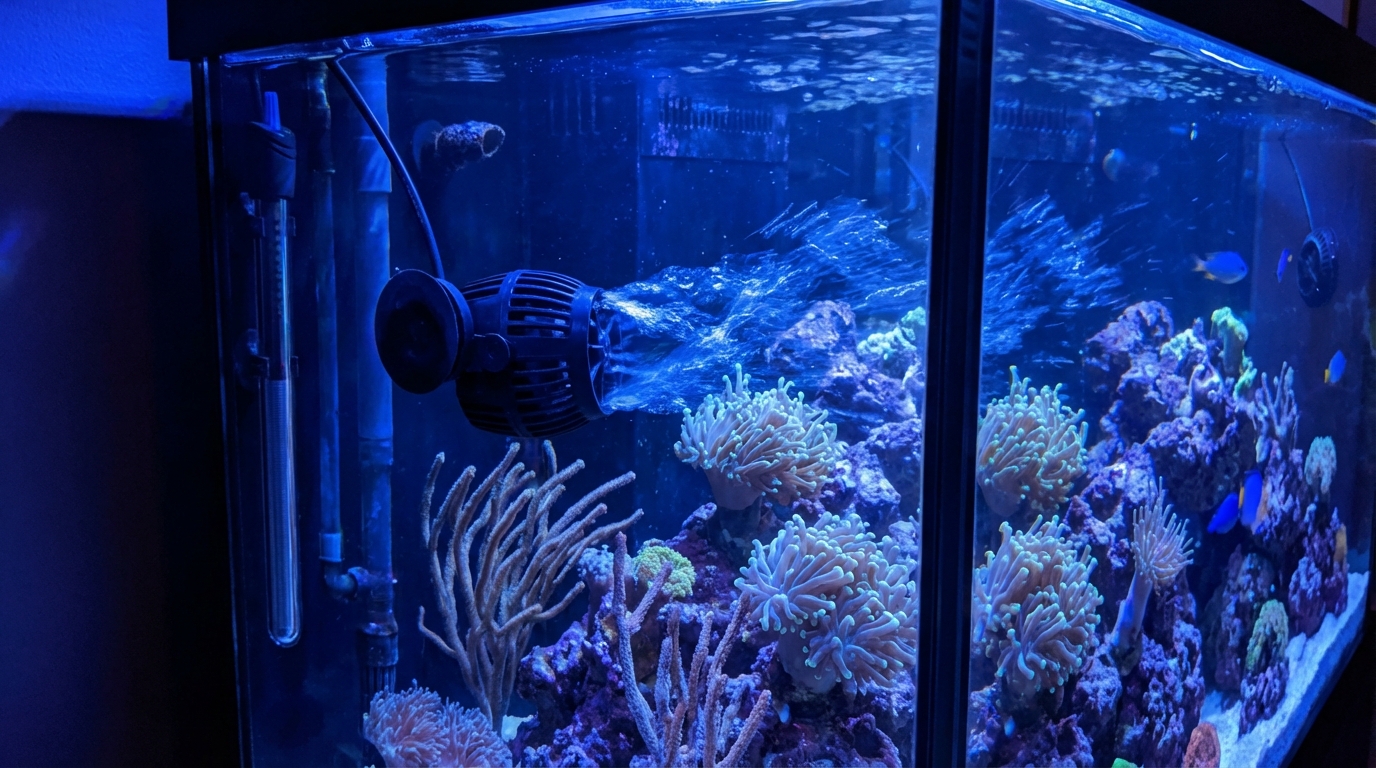
How Do I Position Powerheads and Wavemakers in My Reef Tank?
Quick Answer
Position powerheads to create random, turbulent flow throughout the tank. Aim at rocks and glass to bounce flow around, avoiding direct blasts on corals.
Proper water flow is crucial for a healthy reef tank. Well-positioned powerheads keep corals fed, prevent dead spots where detritus accumulates, and simulate natural ocean currents. Here's how to get your flow right.
Basic Positioning Principles
- Create turbulent, random flow – Not steady laminar jets pointing one direction
- Aim at hard surfaces – Glass, rocks, and overflows diffuse flow naturally
- Avoid direct coral blasts – Especially on LPS polyps which can damage
- Eliminate dead spots – Check corners and behind rockwork
Common Powerhead Placement Strategies
Opposing Powerheads
Place two powerheads on opposite ends of the tank, angled slightly toward each other. When flows collide, they create chaotic turbulence—exactly what corals love in the wild.
Gyre Flow Pattern
Point all powerheads in the same circular direction around the tank. Water rotates in a large gyre, simulating ocean currents. Works well for SPS-heavy tanks.
Bounce Off Glass
Aim powerheads at the back or side glass. Flow bounces off and disperses across the tank in random patterns—a simple way to avoid direct blasts on coral.
Flow Requirements by Coral Type
- Soft corals – Low to moderate flow; gently swaying polyps
- LPS corals – Moderate indirect flow; avoid polyp damage
- SPS corals – High, turbulent flow; polyps should dance but not flatten
If a coral looks stressed, adjust flow first—it's often the culprit.
Total Flow Rate Guidelines
A general rule: aim for 20-50x your tank volume turnover per hour from powerheads alone.
- Soft coral tank: 20-30x turnover
- Mixed reef: 30-40x turnover
- SPS dominant: 40-50x+ turnover
Example: A 100-gallon mixed reef needs 3,000-4,000 GPH of powerhead flow.
Tips for Success
- Use wavemakers – Alternating flow patterns prevent stagnation
- Adjust over time – As corals grow, flow patterns change
- Check dead spots – Look for detritus accumulation as a sign of low flow
- Test with food – Add frozen food and watch where it settles
Track your equipment settings and observations in the ReefBay app so you can fine-tune flow as your tank matures.
Was this helpful?